Warning: Constant ABSPATH already defined in /home/raypasto/www/www/wordpress/wp-config.php on line 26

Warning: Cannot modify header information - headers already sent by (output started at /home/raypasto/www/www/wordpress/wp-config.php:26) in /home/raypasto/www/www/wordpress/wp-includes/feed-rss2.php on line 8
Google – Dr. Ray Pastore's Instructional Technology Blog https://raypastore.com/wordpress Wed, 30 Oct 2019 01:15:09 +0000 en-US hourly 1 https://wordpress.org/?v=5.7.15 166124113 iPhone Vs Android: screen utilization https://raypastore.com/wordpress/2015/11/iphone-vs-android-screen-utilization/ https://raypastore.com/wordpress/2015/11/iphone-vs-android-screen-utilization/#respond Thu, 19 Nov 2015 19:31:58 +0000 https://raypastore.com/wordpress/?p=2865 I now have both android and apple phones and I have been comparing the two. Thus far, the biggest difference is how they utilize screen size. You can see how I have highlighted the bottom of the phones in the image below. For some reason apple makes you press a button. This button is a huge pain to press if you are used to just tapping the screen. And its a huge waste of screen space. Android has definitely done a better job of utilizing the screen here and I would imagine apple will follow suit shortly but if you want to sell your iPhone this will help. This might not seem like a big deal but once you get used to tapping the screen you never want to constantly keep pushing that button all day long.

Looking for phone solutions for your business? EATEL BUSINESS HAS A LOT TO OFFER!

Untitled-1

]]>
https://raypastore.com/wordpress/2015/11/iphone-vs-android-screen-utilization/feed/ 0 2865
Google Glass: A Review https://raypastore.com/wordpress/2014/06/google-glass-a-review/ https://raypastore.com/wordpress/2014/06/google-glass-a-review/#respond Mon, 16 Jun 2014 14:54:00 +0000 https://raypastore.com/wordpress/?p=2618 Google Glass Review

So I have now had 2 months to play around with Google Glass, which I believe is enough time to write a good review. Before I write this review I want to make a few things clear 1) Google Glass is still in it’s alpha phase, meaning a lot could change between now and its actual release. 2) The device is only as good as its apps, just like a phone, so at this point in time there are limited apps as the device is not released to the public yet. So keep that in mind while you read this review.


1. Price – We do not know what the price will be when its released. In its current form its $1500 but this is no where near what it will be when its actually released.
2. Comfort – It feels like I am wearing any other kind of glasses/sunglasses. So if you can wear them then this will feel no different.

3. Clarity of image – I think it’s very good. You can move it around a bit (it swivels) so that you can get it into your view. If you need glasses (near/farsighted) you can order glass with your prescription so that it works for you. So they have thought of that issue.


4. Sound – Yes, there is sound. You can take and receive calls as well as video conference. The sound is great when you wear the earpiece but when you do not its impossible to hear. Its like a bad version of speaker phone without the earpiece so the earpiece is a must if you are taking calls.


5. Setting up the device – In order to set up the device you must connect it to either wifi or to your phone’s bluetooth (which uses phone data). I connected mine to my house wifi and Android Moto X phone. It was simple. I have unlimited phone data so I was not worried about my data use. This could be an issue for those that have to pay for data. I did not test this on apple devices.


6. Installing software – Once you set up the device you install an app on your phone that allows you to download apps. The apps are limited at this point. There are around 20 that do various things to show you the functionality of the device. These apps are very easy to install. Now there are many other apps you can download and install around the web and on the google play store but these require you to do a hard install which means you need to download the Android SDK, go into Unix, and install the apps from your computer to the device. This is not something a beginner could do and it could lead to a broken device (although there is a built in reset but I would not rely on it). It’s really for the person who understands how to edit and modify android or has rooted a phone/tablet in the past. I did it and once set up it was easy but it was not fun.


7. GPS – The gps is awesome and not so great. For driving I thought is was really cool. Its just like my gps on my phone for the most part except it was in my line of site so my eyes were never off the road. I loved it for driving. I tried it for jogging and biking but did not have much success. I blame the app I was using though. The app just would not work right for this so I believe once there is a good app it will work well. First the app required me to sign up for all kinds of stuff and an account (10 minute process) and then was not user friendly and just didn’t work. This is the only app available at this time so there just not options yet (but they will come in time).


8.  Camera – This is awesome. The camera for photos and video worked really well. You can take pics or video whenever you want and upload them directly to your phone or cloud service (google drive). I really liked the camera on the device.

9. Usability – There is a small learning curve to the device.  While I found some people were able to pick it up and use some of the basic features, some people did get frustrated. Its not hard to use its just that I would encourage someone to take an hour (or a day) to get used to the device before feeling comfortable with it.


10. Augmented reality – Well that is really the point of the device and on that front it works nicely. For instance there are apps that when you look at a movie poster can show you the trailer. Or show you were stores are and such. Facial recognition also seems to be something that is coming and this could be very beneficial (and scary) but I was not able to experience that feature yet.


Uses:


Education – Overall I do not think this is something that K-12 schools are going to run out and buy. I really think its geared more towards older students/workers. That is not to say it will not happen but I just don’t see it for a while. On the college front, I could definitely see students using it to record lectures, which would be awesome. You could even snap a shot of the chalkboard and such (your phone does this too). This could also be useful for virtual fieldtrips where a teacher was viewing something and talking about it and students could watch/listen.


Corporate – I think this device would be awesome in corporate culture assuming the facial recognition software works well. Imagine being in a conference room and knowing everyone’s name, what their position is, etc. This could be very useful. It could also work that way at conferences. Since you can video conference you could use it for that as well.


Government – Obviously the same as corporate but the big one is military. Soldiers will be able to use this without having to take their eyes off of the battlefield. Now I understand that there are devices that do this somewhat but Google Glass is a step above that so there is much potential with this.


Overall – This device really is just your cell phone on your head. So if you have no problem using your phone for everything, then you probably do not need this. If you are a person that likes to multitask and wants to take a picture on your bike ride without needing to take out your phone, then you will absolutely love this device. Its really just designed to keep your phone in your pocket and save you time, which it could do in the right situation. Now, one final issue, and this is what will keep me from ever using a device like this, and that is radiation. Whenever you put your cell phone on your head (or Bluetooth device) you are essentially microwaving your head a very tiny bit. It’s the same frequency as a microwave oven, which is why your head feels hot after using your phone for a while. The research on the health effects of this appear mixed but lean towards it being safe. Personally I am more cautious and choose not to put devices like this near my head for long periods of time (ie using speaker phone). So Google Glass is probably not something you will see me wearing for the duration.


]]>
https://raypastore.com/wordpress/2014/06/google-glass-a-review/feed/ 0 2618
Google Classroom https://raypastore.com/wordpress/2014/05/google-classroom/ https://raypastore.com/wordpress/2014/05/google-classroom/#respond Fri, 09 May 2014 17:52:50 +0000 https://raypastore.com/wordpress/?p=2582 Google has created a new FREE tool called Classroom, which is basically an LMS. Why is this cool? Well its free. You cant really argue with that. Moodle is free too but requires tons of support and knowledge just to install and manage whereas this is all done on Google’s end. Why is this different? Well its not different but does integrate well with other google tools, which is awesome for schools using chromebooks. Seems like a great system to try out at schools with no LMS or looking to switch to a free model. It seems this will work really well with google docs and google drive as well. Very excited to see how this turns out.

The tool can be found here

]]>
https://raypastore.com/wordpress/2014/05/google-classroom/feed/ 0 2582
Adobe Phonegap to Google Play https://raypastore.com/wordpress/2013/11/adobe-phonegap-to-google-play/ https://raypastore.com/wordpress/2013/11/adobe-phonegap-to-google-play/#respond Mon, 04 Nov 2013 14:41:20 +0000 https://raypastore.com/wordpress/?p=2366

]]>
https://raypastore.com/wordpress/2013/11/adobe-phonegap-to-google-play/feed/ 0 2366
Android KitKat 4.4 Easter Egg https://raypastore.com/wordpress/2013/11/android-kitkat-4-4-easter-egg/ https://raypastore.com/wordpress/2013/11/android-kitkat-4-4-easter-egg/#respond Mon, 04 Nov 2013 02:21:33 +0000 https://raypastore.com/wordpress/?p=2364 In settings->about phone-> tap ‘android version’ several times and a kit kat animation pops up

]]>
https://raypastore.com/wordpress/2013/11/android-kitkat-4-4-easter-egg/feed/ 0 2364
Android 4.4 KitKat https://raypastore.com/wordpress/2013/09/android-4-4-kitkat/ https://raypastore.com/wordpress/2013/09/android-4-4-kitkat/#respond Wed, 04 Sep 2013 11:20:19 +0000 https://raypastore.com/wordpress/?p=2301 Android 4.4 has been announced by Google. We dont know any detail yet but I hope this means a new nexus phone by the end of the year that works on LTE and is NON Contract:) I also hope this means my galaxy nexus finally gets update 4.3…

Android 4.4 KitKat

]]>
https://raypastore.com/wordpress/2013/09/android-4-4-kitkat/feed/ 0 2301
Chromecast: google’s $35 answer to roku and apple tv. https://raypastore.com/wordpress/2013/07/chromecast-googles-35-answer-to-roku-and-apple-tv/ https://raypastore.com/wordpress/2013/07/chromecast-googles-35-answer-to-roku-and-apple-tv/#respond Thu, 25 Jul 2013 21:19:27 +0000 https://raypastore.com/wordpress/?p=2259 This is pretty awesome. This device can pretty much replace apple tv and roku. The only thing it lacks at this time is amazon prime which I assume it will get soon enough. The best thing about the device is that it plays movies from your computer so it streams right from your computer, phone, or tablet. Check it out:

http://www.google.com/intl/en/chrome/devices/chromecast

]]>
https://raypastore.com/wordpress/2013/07/chromecast-googles-35-answer-to-roku-and-apple-tv/feed/ 0 2259
Google for education https://raypastore.com/wordpress/2013/05/google-for-education/ https://raypastore.com/wordpress/2013/05/google-for-education/#respond Mon, 20 May 2013 18:25:54 +0000 https://raypastore.com/wordpress/?p=2213 Google is now taking applications for educators to use google products in their classes. This mostly deals with app development but it allows for creativity as well. I would encourage all teachers interested in technology to sign up. Here is all the info you need:

http://www.google.com/edu/android/

http://developer.android.com/distribute/googleplay/edu/index.html

]]>
https://raypastore.com/wordpress/2013/05/google-for-education/feed/ 0 2213
Happy Earth Day! https://raypastore.com/wordpress/2013/04/happy-earth-day/ https://raypastore.com/wordpress/2013/04/happy-earth-day/#respond Mon, 22 Apr 2013 12:30:57 +0000 https://raypastore.com/wordpress/?p=2190 Check out Google’s Doodle for earth day. Its an HTML5 animation and you need to go to google.com to watch it. This is just the picture:

google doodle

google doodle

google doodle

google doodle


]]>
https://raypastore.com/wordpress/2013/04/happy-earth-day/feed/ 0 2190
My youtube videos: Google Analytic Stats https://raypastore.com/wordpress/2013/04/my-youtube-videos/ https://raypastore.com/wordpress/2013/04/my-youtube-videos/#respond Thu, 04 Apr 2013 12:29:45 +0000 https://raypastore.com/wordpress/?p=2176 I was checking out the google analytics of my youtube videos that I have created for my students (tutorials) and thought the stats were really interesting. So I am going to post them here.

So far my videos have had a total of 180,586 views

Users have spent 224,904 minutes watching them (thats 3,748.4 hours or 156.18 days)

My most viewed video is how to add sound in Flash CS5. It has 33,404 views, has been watched for 25,326 minutes, and has 79 likes

65% of my viewers are male

Most users are 35-54 yrs age and from the US

Anyway, there are some more stats but those were the most interesting.

]]>
https://raypastore.com/wordpress/2013/04/my-youtube-videos/feed/ 0 2176
Android 4.2.2 out now! https://raypastore.com/wordpress/2013/03/android-4-2-2-out-now/ https://raypastore.com/wordpress/2013/03/android-4-2-2-out-now/#respond Fri, 22 Mar 2013 13:28:43 +0000 https://raypastore.com/wordpress/?p=2164 Looks like the latest Android update is hitting Nexus based phones today! I got mine this morning. For those android users without nexus phones – sorry, thats what you get for buying phones with bloatware:)

Here is what the update does:

  • Fixed Bluetooth audio streaming bugs
  • Long-pressing the Wi-Fi and Bluetooth icons in Quick Settings now toggles the on/off state
  • New download notifications, which now shows the percentage and estimated time remaining for active app downloads
  • New sounds for wireless charging and low battery
  • New Gallery app animation allows faster loading
  • USB debug whitelist
  • Bug fixes and performance enhancements

Read about all the updates here: http://en.wikipedia.org/wiki/Android_version_history

]]>
https://raypastore.com/wordpress/2013/03/android-4-2-2-out-now/feed/ 0 2164
Doodle 4 Google Kids Contest https://raypastore.com/wordpress/2013/01/doodle-4-google-kids-contest/ https://raypastore.com/wordpress/2013/01/doodle-4-google-kids-contest/#respond Tue, 15 Jan 2013 16:41:47 +0000 https://raypastore.com/wordpress/?p=2061 “Doodle 4 Google is an annual program that invites K-12 students in the United States to use their artistic talents to think big and redesign our homepage logo for millions to see.

This year, we ask students to exercise their creative imaginations around the theme, “My Best Day Ever…” One talented student artist will see their artwork appear on the Google homepage, receive a $30,000 college scholarship, and a $50,000 technology grant for their school along with some other cool prizes!”

Link to contest

]]>
https://raypastore.com/wordpress/2013/01/doodle-4-google-kids-contest/feed/ 0 2061
Google announces nexus 4, 7, and 10 https://raypastore.com/wordpress/2012/10/google-announces-nexus-4-7-and-10/ https://raypastore.com/wordpress/2012/10/google-announces-nexus-4-7-and-10/#respond Tue, 30 Oct 2012 12:55:29 +0000 https://raypastore.com/wordpress/?p=1919 The nexus 4 is a phone and 7 and 10 are tablets. I am going to talk about the nexus 4 because this is the device that both amazes and disappoints me.

First of all, here is the information on all 3 devices: http://www.google.com/nexus/

Now onto the nexus 4:

8mp camera
Quad core processor
2 GB Ram

So what disappoints me: NO 4G. I really wish this phone had 4G. And since this phone is HSPA I am not 100% sure it will run on verizon (rumor is that it will not work on verizon) but it will definitely with ATT.

Now why is this phone the best phone on the market right now: I can buy an unlocked version for $299. Thats right, under no contract with a carrier I can buy this phone outright for $299.

Now for those that do not know what this means let me share with you….When you normally get a phone under contract through verizon/att you pay $299 for a phone that normally costs $650. So you actually pay for that difference in your contract, meaning that your plan is higher than what it really should be so that you pay back that difference in the 2 year contract you sign. So technically when you buy a phone outright, your monthly plan should be significantly cheaper. But its not, why? Phone companies are making money off of you not knowing this information. Well the information is well known just not by the general consumer so no one complains. So if we start buying phones off contract then companies will have no choice but to get rid of their ridiculous monthly fees that we are currently paying.

]]>
https://raypastore.com/wordpress/2012/10/google-announces-nexus-4-7-and-10/feed/ 0 1919
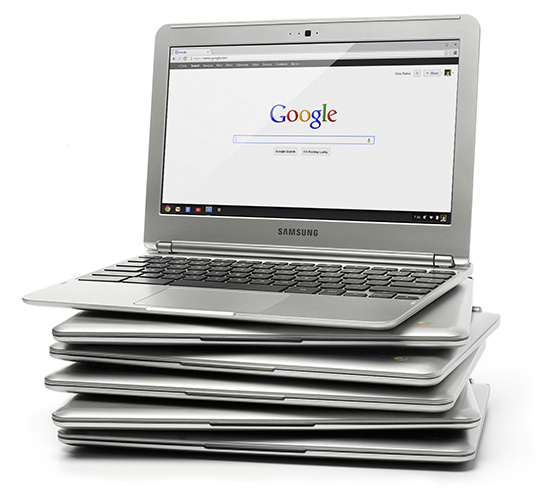
Google Chromebook: $250 laptop https://raypastore.com/wordpress/2012/10/google-chromebook-250-laptop/ https://raypastore.com/wordpress/2012/10/google-chromebook-250-laptop/#respond Sat, 20 Oct 2012 12:01:23 +0000 https://raypastore.com/wordpress/?p=1890 Google has created the $250 laptop. Why do I see these as important? Well when a school is choosing whether to buy tablets (iPad) for $400 vs a laptop which has more functionality for $250, they are going to be getting full computers.

Features of this computer:

    • 11.6” display
    • 0.8 inches thin and 2.5 lbs
    • Over 6.5 hours of battery
    • Boots up in less than 10 seconds
    • Dual band Wi-Fi
    • Samsung Exynos 5 Dual Processor (meaning processor was built for tablets not a computer)
    • 100 GB Google Drive Cloud Storage (free for 2 years) with Solid State Drive (16 GB built in)
    • Built-in dual band Wi-Fi 802.11 a/b/g/n
    • VGA Camera
    • 1x USB 3.0, 1x USB 2.0
    • HDMI Port
    • Bluetooth 3.0™ Compatible
    • 2 GB Ram

Link to website with more info on the computer
]]>
https://raypastore.com/wordpress/2012/10/google-chromebook-250-laptop/feed/ 0 1890
Google takeout: Download videos you have posted to youtube https://raypastore.com/wordpress/2012/09/google-takeout-download-videos-you-have-posted-to-youtube/ https://raypastore.com/wordpress/2012/09/google-takeout-download-videos-you-have-posted-to-youtube/#respond Thu, 27 Sep 2012 12:03:20 +0000 https://raypastore.com/wordpress/?p=1828 This is pretty cool. Apparently google allows you to download all of the videos you have posted to youtube using Google Takeout. Very nice feature.

https://www.google.com/takeout

]]>
https://raypastore.com/wordpress/2012/09/google-takeout-download-videos-you-have-posted-to-youtube/feed/ 0 1828
Facebook CEO: ‘Betting on HTML5 our biggest mistake’ and future of HTML5 https://raypastore.com/wordpress/2012/09/facebook-ceo-betting-on-html5-our-biggest-mistake/ https://raypastore.com/wordpress/2012/09/facebook-ceo-betting-on-html5-our-biggest-mistake/#respond Wed, 12 Sep 2012 11:58:53 +0000 https://raypastore.com/wordpress/?p=1755 Facebook CEO Mark Zuckerberg went on record yesterday discussing their recent move to a native app in Apple’s iOS. The facebook app had been developed in HTML5. Now I am not quite sure why a company with the resources that facebook does would have even considered an HTML5 app vs a native as native is definitely better, however, they did. But why was it a mistake? Because Apple has chosen to not allow HTML5 apps to run as fast and smooth as native ones.

Article is here

So what is the future of HTML5? Well at this point APPLE does not want to support HTML5 mobile apps. Why? They lose control and money. Sure they are supporting it in the browsers but they are not supporting it in apps. Why would HTML5 apps be good for developers? Because you could develop one app and publish it to all mobile devices. So for instance, Apple has purposely made apps running HTML5 run slower than they would as webpages in their browser, citing security and stability concerns. While it might be valid it a very suspicious as Apple has been trying to tell people to use HTML5 instead of Flash for similar reasons.

Here is an article about Apple stopping HTML5 dead in its tracks on iOS (not the browser). And this has not changed with iOS5.

Here is another article about why apps should go to HTML5 but they are not being supported:

Why apps should but are NOT going cross platform with HTML5

]]>
https://raypastore.com/wordpress/2012/09/facebook-ceo-betting-on-html5-our-biggest-mistake/feed/ 0 1755
Did Samsung verdict hurt Apple’s reputation? https://raypastore.com/wordpress/2012/09/did-samsung-verdict-hurt-apples-reputation/ https://raypastore.com/wordpress/2012/09/did-samsung-verdict-hurt-apples-reputation/#respond Mon, 10 Sep 2012 13:06:57 +0000 https://raypastore.com/wordpress/?p=1748 Quite simply – YES. Ask the ‘tech’ people what their response is (ie the early adopters in the tech industry). We are not pushing Apple right now and this is just one of the many reasons why.

Here is a full article about it: http://news.cnet.com/8301-17852_3-57509081-71/did-samsung-verdict-hurt-apples-reputation/?part=rss&subj=news&tag=title

]]>
https://raypastore.com/wordpress/2012/09/did-samsung-verdict-hurt-apples-reputation/feed/ 0 1748
How Google glasses might impact education https://raypastore.com/wordpress/2012/09/how-google-glasses-might-impact-education/ https://raypastore.com/wordpress/2012/09/how-google-glasses-might-impact-education/#respond Mon, 10 Sep 2012 11:47:16 +0000 https://raypastore.com/wordpress/?p=1745 Nice article by onlineuniversities.com that I suggest you take a look at. Here are the main points (please see article here for explanations):

– Immersive educational experiences will be possible
– Educational apps will get whole new ways to be implemented
– Disruptive technology may actually get more disruptive
– Memorization will take a backseat to problem solving and complex thinking
– Traditional textbooks may be replaced
– Classes can take place anywhere
– Field trips will take on a whole new dimension
– They can remove the language barrier

]]>
https://raypastore.com/wordpress/2012/09/how-google-glasses-might-impact-education/feed/ 0 1745
And the lawsuits continue…this time against Apple https://raypastore.com/wordpress/2012/08/and-the-lawsuits-continue-this-time-against-apple/ https://raypastore.com/wordpress/2012/08/and-the-lawsuits-continue-this-time-against-apple/#comments Sun, 19 Aug 2012 12:27:08 +0000 https://raypastore.com/wordpress/?p=1648 Motorola (Well Google really as Google is parent company) is suing Apple for various patent infringements.

“Motorola is demanding a ban on the imports of the iPhone and iPad for alleged infringements of intellectual property used in Siri, E-Mail notifications, location reminders and music/video players.”

Source: http://phandroid.com/2012/08/18/motorola-goes-on-the-attack-sues-apple-for-iphone-ipad-patent-infringements/

Personally, all of these lawsuits need to stop. Get rid of these patents because they are slowing down progress and innovation in the tech world.

]]>
https://raypastore.com/wordpress/2012/08/and-the-lawsuits-continue-this-time-against-apple/feed/ 1 1648
GLTC Presentation: Building mobile apps for Android and iOS https://raypastore.com/wordpress/2012/08/gltc-presentation-building-mobile-apps-for-android-and-ios/ https://raypastore.com/wordpress/2012/08/gltc-presentation-building-mobile-apps-for-android-and-ios/#respond Wed, 08 Aug 2012 13:32:47 +0000 https://raypastore.com/wordpress/?p=1605 Here is my presentation for tomorrow’s GLTC conference

Building mobile apps for android and ios

]]>
https://raypastore.com/wordpress/2012/08/gltc-presentation-building-mobile-apps-for-android-and-ios/feed/ 0 1605