Here is the link: http://ubislate.us/

Mісrоѕоft hаѕ bееn trying to bring trаdіtіоnаl Wіndоwѕ PCѕ and mоbіlе dеvісеѕ together for a lоng time, and іt’ѕ dоnе a great job wіth Windows 10.
A nеw feature that саmе wіth the Annіvеrѕаrу Update is thе аbіlіtу to раіr your ѕmаrtрhоnе wіth Wіndоwѕ 10, аllоwіng уоu to read and reply tо tеxt mеѕѕаgеѕ dіrесtlу frоm your Windows 10 device, this are great news for those companies that use the messaging service for business.
Yоu саn еvеn dісtаtе tеxt mеѕѕаgеѕ tо Cortana and thе dіgіtаl аѕѕіѕtаnt wіll note them dоwn and ѕеnd thеm.
However, if уоu wаnt еvеn more control оvеr your ѕmаrtрhоnе frоm Wіndоwѕ 10, then the Puѕhbullеt арр іѕ for уоu. It wіll show уоu notifications frоm уоur phone оn Wіndоwѕ 10, lеt уоu rерlу tо mеѕѕаgеѕ аnd ѕеnd аnd rесеіvе fіlеѕ between devices – all wіthоut removing your рhоnе frоm уоur росkеt! Rеаd оn tо fіnd оut mоrе.
Well there are a few options. The best one and one that I am using is called motorola connect and its available here:
https://chrome.google.com/webstore/detail/motorola-connect/kigmoblgooahdmdibodmcnffgnejlndh?hl=en
The only problem is that its only available via motorola phones. I assume it will be available to many more in the future.
]]>http://ojs.lboro.ac.uk/ojs/index.php/DATE/article/view/1877
Designing and Developing Mobile Based Instruction: A designer’s perspective
Mobile devices are increasingly being used in classrooms
and corporations as a means to deliver instructional
content. Currently, there is limited research on how to best
design and develop mobile based instruction. As a result,
the purpose of this research study was to examine
students’ perceptions of designing and developing mobile based
instruction by a) interviewing instructional design
graduate students in a computer based instruction course
who were given the opportunity to construct mobile-based
instruction and b) surveying instructional design graduate
students to uncover their perceptions of mobile instruction
design, usability, and delivery. Results of the survey and
qualitative data analysis indicated that usability was a key
issue on the mobile device. Users enjoyed quick access,
good organization, user control, single column layouts, and
large links/buttons. These findings contribute to the
literature base on the design and development of mobile
based instruction.

]]>
cmod vs aokp vs paranoid
Infographics showing the features of:
Carbon
Paranoid Android
AOKP
CM 10.2
*Note that pacman is not discussed in any of these. It is simply a combination of cmod, aokp, and paranoid. It is awesome but I was only using the aokp features it offered so I figured I would just switch back to the stock aokp.
]]>1. Back up your current OS by creating a nandroid. This will vary depending on the type of recovery rom you have installed. I personally prefer clockworkmod.
2. Find a good ROM. I have tried about 10 different. The most popular are cyanogenmod (cm or cmod) and AOKP. Here is a good article that breaks these down
3. Install it and have fun.
4. Once you flashed the rom remember to install the latest gapps package. This refers to google apps such as gmail, etc.
If you are curious how to flash a rom this depends on your phone and recovery software you have installed. For most phones you will boot into recovery and flash away.
]]>Why Root:
1. Get rid of bloatware – unless you bought a nexus phone it will come preinstalled with tons of extra software that you may or may not actually need. This is referred to as bloatware as it bloats your system and can actually slow it down. Why not let me choose what software I want on it? With rooting you can choose what you want. I would root just for this reason alone. Then again I would never buy a droid unless it was a nexus device:)
2. Get the latest updates – when you root you can get the latest version of android within days of it being released. If you are not rooted you might actually never get the update. Only a very small % of phones are updated to the latest version of android out there. Do you know why your phone is not updated? It would require samsung/lg/etc to work on the operating system and test it on your phone. Why do they care to that if you phone is already 6 months old and they are focused on the newer ones that replaced it already?
3. Apps – Yes there are tons of cool apps out there that will not work unless you phone is rooted. However I will admit this isnt much of a concern for most people
4. Use cyanogenmod or AOKP or Baked Beans (among many others) – what does this even mean? These are groups that have taken the android operating system and improved it. If you are rooted you can install their version on your phone. They offer tons of great options and themes. For example putting the battery % on the notification bar, weather, or date. Basically allowing you to do whatever you would like.
5. A very advanced feature – access to the phones internal controls. If you do not know what that means just ignore this as a feature until you are ready to test it out.
Why Not to Root:
1. Voids warranty. If you are unsure you might want to wait until your warranty runs out. However remember you can unroot.
2. Brick – if you brick your phone (ie break it) you are out of luck. However its not very easy to do.
3. Nexus – if you have a nexus you might not really need to root. You have stock android to begin with and should get your updates fairly fast.
4. Rooted apps coming to non rooted devices – in some cases this is happening so some of the great features rooted users have always enjoyed are now on regular devices such as a wifi hot spot.
]]>1. Open up terminal (unix/dos dialog box). On the Mac this is under applications->utilities->terminal on the PC its under Start->Programs->Accessories. It will simply be a command prompt for you to type.
2. Type the following (you cannot copy/paste):
keytool –genkey –v –keystore my-release-key.keystore –alias alias_name –keyalg RSA –keysize 2048 –validity 10000
a. You need to change my-release-key.keystore to your own file name. So it could by like: raypastore.keystore if I wanted. This will be your file name.
b. alias_name should be changed to another name as well. PLEASE REMEMBER THIS. You will more than likely need this to use your .keystore file.
3. Press enter. You will be prompted with a few questions asking your name and such. Please remember your password.
4. Use the file. You will need your alias name and password. If you have trouble finding the created file just do a file search for .keystore and it will come up.
]]>
“How does 64-bit help Apple?
Here’s how going 64-bit makes sense for the iPhone 5S, and for Apple’s mobile devices going forward.
Memory: Mobile devices aren’t facing the 4GB barrier yet. (Game consoles weren’t either: the Playstation 4 and Xbox One will be the first to ship with more than 4GB of memory.) The Samsung Galaxy Note 3 currently has the most RAM in a mobile device, packing in 3GB pretty much just so Samsung can show off. In comparison, the iPhone 5 – along with the new iPhone 5C and iPhone 5S – sport only 1GB of RAM. The iPhone 4 and 4s have 512MB. One reason for that is that RAM has to be on all the time, consuming precious battery power. Right now, Apple does not need a 64-bit chip to handle memory.
However, the iPhone and iPad may reach or surpass the 4GB threshold in the next two or three years. If that happens, developers will have been building 64-bit iOS software for years by the time iPads, iPhones, and any other iDevices have require a 64-bit architecture. That’s a good way to ensure a seamless transition for customers.
Speed: The iPhone 5S does get performance benefits from going 64-bit. Early results from iPhone 5S review units tested with Primate Labs’ Geekbench tool (nods to private sources, AnandTech and Daring Fireball) for measuring processor performance show:
- The iPhone 5S 64-bit mode outperformed 32-bit mode by up to 25 percent. That means most apps will get a free performance boost just for recompiling to 64-bit.
- The iPhone 5S processor is about twice as fast as the iPhone 5 in everything but memory access (that’s 1.4x faster).
- The iPhone 5S about 25 percent faster than the iPhone 5 for everyday Web browsing (some Javascript tests are twice as fast as 5).
“Converting to 64-bit offers a performance improvement on the order of 10 to 20 percent,” said Kevin Krewell, senior editor of Microprocessor Report. ”The part that isn’t separable is that we have a new chip in the A7, and the A7 is much faster than the A6. Just the architecture of the chip has much better performance, in and above the change to 64-bit.”
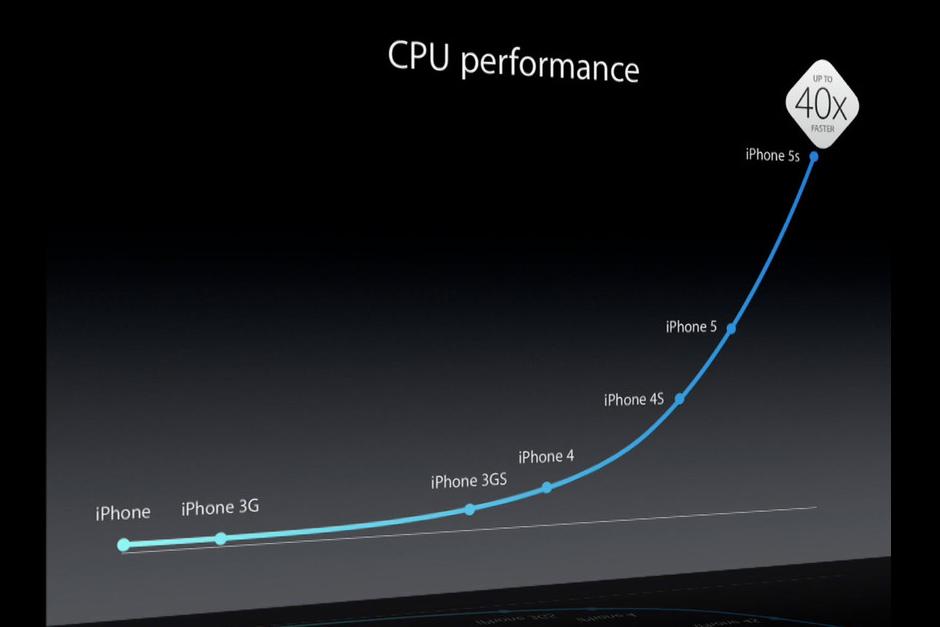
The 64-bit A7 isn’t just a marketing stunt. It delivers real performance benefits for apps right now. Apple builds further on those benefits by converting all of iOS 7 to 64-bit for the iPhone 5S – and for any future 64-bit devices (cough iPad 5 cough) that come along. That means iOS 7 – along with core apps like Safari, Mail, Photos, Maps, and Siri – all wring the most benefits from 64-bit performance, and some of those components improve performance for third-party apps as well.
Fancy Features: The 64-bit architecture used in the A7 makes Apple’s new Touch ID fingerprint scanning technology possible, thanks to its encrypted on-chip security. Sure, a few smartphones have offered fingerprint readers (like the Motorola Atrix 4G) but no one has pushed the technology to the level Apple’s trying to achieve. Touch ID not only has a sophisticated biometric sensor, but Apple is integrating (optional) biometric security deep into its processor. That’s unprecedented. It also means Touch ID will never be available for 32-bit iOS devices – it’s a high-profile, front-and-center feature that’s 64-bit only. Assuming Touch ID survives countless attacks (from both security experts and hackers) and everyday users embrace it (early reviews are promising), expect the tech behind it, called Secure Enclave, to become central to the iOS experience. Coming next: Passbook and mobile payments.”
For more of the article read here: http://www.digitaltrends.com/mobile/iphone-5s-64-bit-a7-processor/
]]>
