Warning: Constant ABSPATH already defined in /home/raypasto/www/www/wordpress/wp-config.php on line 26

Warning: Cannot modify header information - headers already sent by (output started at /home/raypasto/www/www/wordpress/wp-config.php:26) in /home/raypasto/www/www/wordpress/wp-includes/feed-rss2.php on line 8
multimedia – Dr. Ray Pastore's Instructional Technology Blog https://raypastore.com/wordpress Fri, 15 May 2020 20:11:17 +0000 en-US hourly 1 https://wordpress.org/?v=5.7.15 166124113 How much does sound quality matter when recording a video or podcast? https://raypastore.com/wordpress/2019/10/how-much-does-sound-quality-matter-when-recording-a-video-or-podcast/ https://raypastore.com/wordpress/2019/10/how-much-does-sound-quality-matter-when-recording-a-video-or-podcast/#respond Sat, 12 Oct 2019 12:22:33 +0000 https://raypastore.com/wordpress/?p=3306 Sound quality if very important when creating a video or podcast. Instead of telling you how important sound quality is, I decided to run an experiment showing you how different mics sound. The difference is telling, especially when you hear the difference between a nice mic and your standard mic on your laptop. When you hear the two one after another the difference is HUGE! Here is a link for the Blue Yeti Mic I use when recording my sound – https://amzn.to/2qPRlYm. Take a look for yourself in the following video:

]]>
https://raypastore.com/wordpress/2019/10/how-much-does-sound-quality-matter-when-recording-a-video-or-podcast/feed/ 0 3306
Adobe Captivate Virtual Reality (VR) https://raypastore.com/wordpress/2019/08/adobe-captivate-virtual-reality-vr/ https://raypastore.com/wordpress/2019/08/adobe-captivate-virtual-reality-vr/#respond Sat, 24 Aug 2019 12:26:47 +0000 https://raypastore.com/wordpress/?p=3269 In this video I review and show you how to use Adobe Captivate’s VR feature. Here is a summary of my findings:

What it is – A very easy to use VR developing environment. You can use both videos and images. Create quizzes. Create hotspots. Have users go through a specific path.

Tech required – 360 Camera. You really need a 360 camera to use this. Fortunately they are inexpensive and adobe gives you a few images and videos to play around with to explore the feature. If you are looking for one, here is the one we use in my technology lab: https://amzn.to/2ZsDGpv

Developing – Really easy. Like super easy. I give Adobe a 5/5 for ease of use. Its not super complicated but that is welcome considering its a up and coming feature that will really get fleshed out over the next few years.

Testing –

Browser – works awesome! This is where the program shines. Doesn’t require a VR device and anyone can use it on a browser. I tested Chrome and Firefox and both worked perfectly. It was really amazing (tbh)

Mobile – This means you are using Google cardboard to view. I was not impressed. First I should mention I hate viewing VR on a phone. I think its just terrible. But if you don’t have other options then its worth trying. Ok, so it works to view but you can’t actually press any hotspots. So that was a big issue if you need to have a quiz or any interactivity. Just putting someone in a room and letting them look around worked fine.

VR Headset – I tested the latest Oculus Quest headset. So to access the program from a VR headset you need to use a VR browser. I used the default Oculus Browser as well as Firefox. Here was the issue – I could view the program and it worked when I viewed the browser as a flat screen. So in VR you can view a browser as a flat screen (like a monitor) or immerse yourself into it (what VR should be). Unfortunately it did not work when you immersed yourself in. You could look around but it didn’t recognize the hand units to press any hotspots. So quizzes and hotspots were a no no.

Overall – Honestly I love it. Yep it doesn’t work well with the VR headset but the fact that it works with the browser is huge. I think there is a lot of application for it. I do however hope they keep working on the product and get it to work with the hand controllers to it works with VR headsets better.

Here is my video demo:

]]>
https://raypastore.com/wordpress/2019/08/adobe-captivate-virtual-reality-vr/feed/ 0 3269
Does the multimedia principle matter? How much? https://raypastore.com/wordpress/2018/07/does-the-multimedia-principle-matter-how-much/ https://raypastore.com/wordpress/2018/07/does-the-multimedia-principle-matter-how-much/#respond Tue, 17 Jul 2018 20:06:01 +0000 https://raypastore.com/wordpress/?p=3086

]]>
https://raypastore.com/wordpress/2018/07/does-the-multimedia-principle-matter-how-much/feed/ 0 3086
Call For Papers – Journal of Training, Design, and Technology (JTDT) https://raypastore.com/wordpress/2017/02/call-for-papers-journal-of-training-design-and-technology-jtdt/ https://raypastore.com/wordpress/2017/02/call-for-papers-journal-of-training-design-and-technology-jtdt/#respond Wed, 01 Feb 2017 20:30:49 +0000 https://raypastore.com/wordpress/?p=2981 Call for Papers
Journal of Training, Design, and Technology (JTDT) – http://tdtjournal.blogspot.com/

ISSN 2475-0921

Call for papers:

The Journal of Training, Design, and Technology (JTDT) is a new online journal seeking submissions.

JTDT is designed to bring together current practices and research. The journals focus is on the following:

Instructional Design
Instructional Technology
Research – manuscripts
Practice – case studies, lessons learned, etc
Instructional Models
Instructional Strategies
Technologies
Usability
Virtual Reality
Mobile Technology
Learning/Training
Multimedia
Games/simulations
Instructional Development
Analysis and Evaluation
Performance Improvement

Types of papers:

Research Manuscripts
Brief articles (on current practice or theory)
Book reviews
Technology reviews
Strategy reviews (Using a strategy in the workplace/classroom)
Case studies
Special Topic papers
Literature Reviews

All papers are blind peer reviewed.

Please see our submission guidelines and submit papers to tdtjournal@gmail.com

Deadline – There is no deadline as volumes will continuously be released. First volume will be published 3/1/2017 with more after that.

]]>
https://raypastore.com/wordpress/2017/02/call-for-papers-journal-of-training-design-and-technology-jtdt/feed/ 0 2981
Multimedia: Learner Preferences For Multimedia Learning https://raypastore.com/wordpress/2015/03/multimedia-learner-preferences-for-multimedia-learning/ https://raypastore.com/wordpress/2015/03/multimedia-learner-preferences-for-multimedia-learning/#respond Tue, 03 Mar 2015 12:36:38 +0000 https://raypastore.com/wordpress/?p=2737 This is my latest publication. This was a really interesting study on multimedia and I am doing a follow up. Here is the abstract and link to full article:

ABSTRACT: Today’s learners are using multimedia on a daily basis. From computers to cell phones, it’s very difficult to get through a day without being exposed to multimedia. Prior research from Mayer and colleagues has revealed the multimedia principle, which communicates that two representations that explain for one another are better for learning than just one. While much of this research focused on cognitive load and learning, it did not focus on learner preference. As a result, a survey was presented to learners to discover their preferences for the multimedia, modality, redundancy, and coherence principles in a multimedia environment. Overall, participants agreed that they preferred multiple representations to a single one. However, the most surprising results were found when learners were presented redundant representations and irrelevant details. Learners indicated they preferred redundant text and sound with images to image and text or images and sound and that they preferred highly detailed and colored images to simple images. This indicates that while learners may learn better if we following the multimedia principles, they might decrease learner interest or motivation, which could have an impact on instruction

Citation:

Pastore, R. (2014). Multimedia: Learner Preferences For Multimedia Learning. Journal of Multimedia Processing and Technologies, 5(4), 134-144.

]]>
https://raypastore.com/wordpress/2015/03/multimedia-learner-preferences-for-multimedia-learning/feed/ 0 2737
Pete&C 2015 https://raypastore.com/wordpress/2015/02/petec-2015/ https://raypastore.com/wordpress/2015/02/petec-2015/#respond Thu, 12 Feb 2015 19:55:21 +0000 https://raypastore.com/wordpress/?p=2717 This year’s conference was a success. For a copy of my presentation click the link here:

petec2015

]]>
https://raypastore.com/wordpress/2015/02/petec-2015/feed/ 0 2717
Using Excel as an artistic platform https://raypastore.com/wordpress/2014/10/using-excel-as-an-artistic-platform/ https://raypastore.com/wordpress/2014/10/using-excel-as-an-artistic-platform/#respond Sun, 26 Oct 2014 12:20:06 +0000 https://raypastore.com/wordpress/?p=2666 Yes apparently people are doing it. I have no idea why but it pretty amazing what they are doing. You can check out more art here but I have posted a few examples.

]]>
https://raypastore.com/wordpress/2014/10/using-excel-as-an-artistic-platform/feed/ 0 2666
Chromecast: google’s $35 answer to roku and apple tv. https://raypastore.com/wordpress/2013/07/chromecast-googles-35-answer-to-roku-and-apple-tv/ https://raypastore.com/wordpress/2013/07/chromecast-googles-35-answer-to-roku-and-apple-tv/#respond Thu, 25 Jul 2013 21:19:27 +0000 https://raypastore.com/wordpress/?p=2259 This is pretty awesome. This device can pretty much replace apple tv and roku. The only thing it lacks at this time is amazon prime which I assume it will get soon enough. The best thing about the device is that it plays movies from your computer so it streams right from your computer, phone, or tablet. Check it out:

http://www.google.com/intl/en/chrome/devices/chromecast

]]>
https://raypastore.com/wordpress/2013/07/chromecast-googles-35-answer-to-roku-and-apple-tv/feed/ 0 2259
Flash is dead: Why this rumor makes sense for (some) instructional designers and why it’s not true https://raypastore.com/wordpress/2012/08/flash-is-dead-why-this-rumor-makes-sense-for-instructional-designers-and-why-its-not-true/ https://raypastore.com/wordpress/2012/08/flash-is-dead-why-this-rumor-makes-sense-for-instructional-designers-and-why-its-not-true/#comments Thu, 23 Aug 2012 13:00:18 +0000 https://raypastore.com/wordpress/?p=1665 I keep seeing forum posts like this in LinkIn and I have really been thinking a lot about it. Why have I been thinking a lot about it? Well because Flash is a very powerful software and there is currently nothing that matches its power. So how is Flash dead if there is not replacement for it? Then it all clicked and here are my thoughts….

1. HTML5 Rumors. HTML5 has been touted as a potential replacement to Flash. It does have some of the same capabilities. The issue is that HTML5 is really geared towards simple animations and interactions, not powerful animations that Flash is designed for. Thus HTML5 cannot replace Flash at this point. Will it ever? Quite possibly it will (I personally think it will be HTML6 that does it) but at this point you really need to know both Flash and Javascript so that you can offer multiple solutions to clients. I personally would not develop a game in HTML5 unless it was very simple because it just doesnt have the power to create something more in-depth.

2. Flash player is dying. Yes that is true in the mobile platform, but not the desktop/laptop. However, Adobe has instead focused on Adobe Air for the mobile platform and stopped focusing on flash player. What is Adobe Air: It allows you to publish Apps for iPhone, iPad, and Android. This leads to point 3.

3. Flash doesnt work on Apple iPad or iPhone. Well that is not true. It doesnt work in their browsers but it works very well on the devices. If you look at both Apple and Android, they are pushing apps, not the browers (at least that is what they want developers to focus on so that they can control (or make money off of) their stores). So Adobe is pushing Flash to mobile apps not the browsers (and they didnt have much of a choice as apple would not allow flash player on its browser). To publish a Flash app to iPhone or iPad, you simply click the publish button in Flash to publish as an app. And yes, there are tons of apps (some in the top 50 games) that are purely Flash based and you probably never knew. So yes, Flash does work very well on iPhone and iPad.

4. Instructional designers are not programmers. Our field is not computer science and I do not expect an ISDer to be able to program. Flash requires a lot of programming so most instructional designers cannot use it beyond basic tweens and maybe some simple interactions. As a result, they have turned to other software, such as Articulate, Lectora, PPT, Captivate, etc. that are very easy to use. That way the instructional designer can now also develop training without the need for a programmer and tout themselves as a one stop shop. The problem is that this software is not always the solution. It is simple software and produces simple training. What do I mean by simple training? I just mean training with some animation, limited interaction, and is perfect for flashcard type training (that can includes stories, cases, simple games etc.). I am not saying its bad, this simple software can create great training, just that its not a be-all end-all for training. It is not a total solution. It cannot do everything. If someone were to tell me they were going to use one of the simple software mentioned above (or any software for that matter) to develop my training without seeing my needs analysis and design requirements, I would be very very scared that they did not know what they were doing. You simply need to have Flash and other programming software in your arsenal. If you do not you are really limiting what you can do.

Just an fyi here. I am not against the ISDer being a developer or anything like that. I am an ISDer that is a developer as well. I can program and use all of the software I have mentioned above. I also like all of the software I have mentioned. I love HTML5. But I still just cannot figure out how ISDers are trying to dismiss Flash when none of the software I mentioned above matches its power. Am I biased? Well I do really like Flash but I also really like a lot of other software too. I probably like javascript the best which is what HTML5 is based on so if anything I probably like HTML5 more. I just know that most ISDers are not programmers and they are touting solutions that may not be appropriate because they want to be the one stop shop. Additionally I know that since most ISDers are not developers they are listening to a rumor and dismissing Flash just because they do not know any better because they do not know what any of this software does as they are not developing with it and thus believe this light software is actually a replacement for Flash. Maybe I am wrong? Actually I hope I am but I just do not see many other reasons.

]]>
https://raypastore.com/wordpress/2012/08/flash-is-dead-why-this-rumor-makes-sense-for-instructional-designers-and-why-its-not-true/feed/ 1 1665
Basic rules of interface design for computers and mobile devices https://raypastore.com/wordpress/2012/06/basic-rules-of-interface-design-for-computers-and-mobile-devices/ https://raypastore.com/wordpress/2012/06/basic-rules-of-interface-design-for-computers-and-mobile-devices/#respond Wed, 20 Jun 2012 12:41:58 +0000 https://raypastore.com/wordpress/?p=1408

žRemember these are guidelines not absolute laws. They are meant to be broken at the right times. Usually when they are broken though, it is at the wrong times because people do not understand how to apply them.
ž
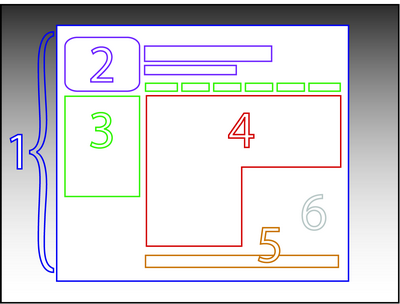
Divine Proportion – that when creating a web page, the content and sidebar should have an proportion of 1.618

Example:
ž
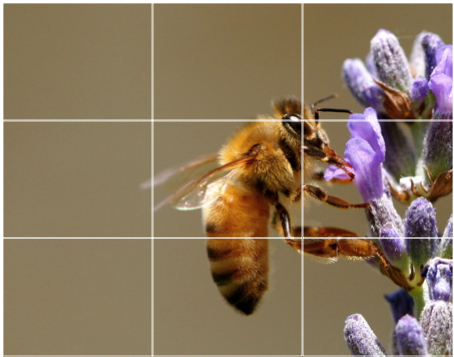
Rule of thirds – We should place objects along the lines and points along the thirds as shown in the image:

ž
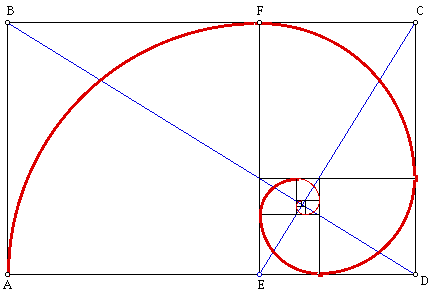
Golden rectangle – related to the divine proportion (just applying the concept) into a perfect shape. “The ratio, called the Golden Ratio, is the ratio of the length to the width of what is said to be one of the most aesthetically pleasing rectangular shapes. This rectangle, called the Golden Rectangle, appears in nature and is used by humans in both art and architecture. The Golden Ratio can be noticed in the way trees grow, in the proportions of both human and animal bodies, and in the frequency of rabbit births. “

ž
Grids – Essentially the most basic form of design for interfaces. We layout a page in a grid. It is of extreme importance to plan out this grid before starting development so that your CSS is correct.

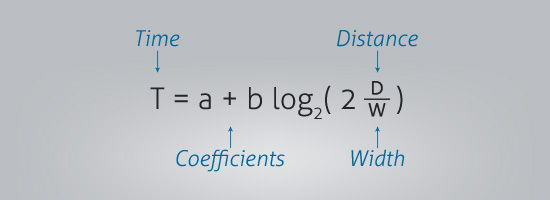
Fitt’s Law – While Fitt’s law looks confusing at first as presented in the image below it is actually quite simple. Essentially it means that the less distance between links/buttons etc that need to be pressed in order, the more usable the page is. Additionally, the bigger the buttons are, the less chance there is of user error.

]]>
https://raypastore.com/wordpress/2012/06/basic-rules-of-interface-design-for-computers-and-mobile-devices/feed/ 0 1408
File sizes and download speeds of 56k, 3G, 4G, and High speed wireless internet https://raypastore.com/wordpress/2012/05/file-sizes-and-download-speeds-of-56k-3g-4g-and-high-speed-wireless-internet/ https://raypastore.com/wordpress/2012/05/file-sizes-and-download-speeds-of-56k-3g-4g-and-high-speed-wireless-internet/#respond Mon, 21 May 2012 11:39:27 +0000 https://raypastore.com/wordpress/?p=1224 Here is a chart I made comparing speeds of various internet connections and showing how fast/slow one would expect their files to download. Remember that these are really hypothetical and depend so much on where you are, what kind of device you have, etc. You should also remember that equipment you are using should be regularly maintained (visit BoostPoorSignal.com for more info). Theoretically 4G and high speed internet should be nearly the same but realistically this is not the case. So please do not take these as fact, rather, use this chart as a guide to consider when developing for both web and mobile devices.

100kb 250kb 500kb 1mb 1gb
56k Modem 15 seconds 36 seconds 1 minute 2.5 minutes 1 day 18 hours
3G <1 second 6 seconds 12 seconds 25 seconds 7 hours
High Speed/Wireless/4G <1 second 1 second 3 seconds 5 seconds 1.5 hours

*note – these speeds assume best case scenario. More than likely all speeds will be
Slower. Both 3G and 4G speeds will probably be significantly slower, especially as 4G max.

Your PC behaving strangely? Is it very slow? Does it crash very often? Doesn’t it boot at all? Well, these are common problems, that everybody have met in their life – to be honest, I’ve got these problems several times – and this comes from several reasons, but the first is: tech devices ages very fast. Xtra-PC is a small USB device that you plug into an old, slow or dead computer (Windows or Mac) to give it new life. Basically, it’s a custom operating system, based on the proven foundation of Linux, that runs directly from the Xtra-PC USB device, and it even works on computers with a missing or crashed hard drive. Find xtra pc reviews on privacycritic.com.

Speeds are not even available yet.

If you

]]>
https://raypastore.com/wordpress/2012/05/file-sizes-and-download-speeds-of-56k-3g-4g-and-high-speed-wireless-internet/feed/ 0 1224
Flash to HTML5: Buttons https://raypastore.com/wordpress/2012/05/flash-to-html5-buttons/ https://raypastore.com/wordpress/2012/05/flash-to-html5-buttons/#respond Thu, 10 May 2012 12:53:00 +0000 https://raypastore.com/wordpress/?p=1180 In this clip I test Adobe Flash’s HTML5 conversion tool. I test motion tweens, masks, and buttons via Wallaby, which is the conversion tool. I test the HTML output file in Safari, Chrome, and Firefox. The motion tweens and masks work in both Safari and Chrome. Nothing works in Firefox. The buttons do not work in any browser. While Wallaby has potential, this is a big limitation. This means that it is currently only useful for animations but not interactivity.

Check out the demonstration:


]]>
https://raypastore.com/wordpress/2012/05/flash-to-html5-buttons/feed/ 0 1180
Flash CS6 to HTML5 https://raypastore.com/wordpress/2012/05/flash-cs6-to-html5/ https://raypastore.com/wordpress/2012/05/flash-cs6-to-html5/#respond Tue, 08 May 2012 12:48:35 +0000 https://raypastore.com/wordpress/?p=1168 The following video demonstrates Adobe Flash’s CS6 to HTML5 conversion tool codenamed Wallaby. The tool converted my file in one second. It worked great in Safari but did not work in Firefox. I am not sure if Flash’s tool is not working or HTML5 is not working. I say this because of the compatibility issues I have with HTML5, especially in Firefox. Also, Adobe’s Wallaby tool was last updated on March 8th, which means that a new version is just around the corner. Overall, I am impressed it worked but need to test this with more advanced Flash files. I was not really surprised there was a compatibility issue as that is HTML5. Here is the video with the demonstration:

]]>
https://raypastore.com/wordpress/2012/05/flash-cs6-to-html5/feed/ 0 1168
How to share a youtube video on WordPress https://raypastore.com/wordpress/2012/04/how-to-share-a-youtube-video-on-wordpress/ https://raypastore.com/wordpress/2012/04/how-to-share-a-youtube-video-on-wordpress/#respond Tue, 24 Apr 2012 16:16:59 +0000 https://raypastore.com/wordpress/?p=1042 The following video walks you through sharing a youtube video on your WordPress blog:

]]>
https://raypastore.com/wordpress/2012/04/how-to-share-a-youtube-video-on-wordpress/feed/ 0 1042
Install and setup a WordPress Blog – Updated https://raypastore.com/wordpress/2012/04/install-and-setup-a-wordpress-blog-updated/ https://raypastore.com/wordpress/2012/04/install-and-setup-a-wordpress-blog-updated/#respond Sun, 08 Apr 2012 14:23:25 +0000 https://raypastore.com/wordpress/?p=959 I have a tutorial already on how to install and set up wordpress however the newest version of wordpress is slightly different so here is the updated version:

[youtube=http://www.youtube.com/watch?v=GD4wmiQiBaY]

]]>
https://raypastore.com/wordpress/2012/04/install-and-setup-a-wordpress-blog-updated/feed/ 0 959
What are multiple representations (i.e., multimedia) ? https://raypastore.com/wordpress/2012/04/what-are-multiple-representations-i-e-multimedia/ https://raypastore.com/wordpress/2012/04/what-are-multiple-representations-i-e-multimedia/#respond Thu, 05 Apr 2012 12:41:48 +0000 https://raypastore.com/wordpress/?p=940 The use of multimedia in education has become increasingly important as the technology to design, develop, and use it are becoming more popular. Multimedia refers to external representations of words (text, words, audio) and visuals (images, video, animations, and graphs) (Mayer, 2005). The use of multiple external representations (MERs) in multimedia learning environments has been shown to be an effective way to support learning and increase comprehension (Schnotz & Lowe, 2003), which directly relates to the CTML, where we can process more than one representation at the same time (Mayer, 2001). Processing of MERs in multimedia learning environments (MLE) begins in working memory where learners, with the aid of prior knowledge, create internal representations and store them into long-term memory (Seufert, 2003).

A representation is “something that stands for something else” and has been described by Palmer (1978) as (1) the represented world, (2) the representing world, (3) the aspects of the represented world being modeled, (4) the aspects of the representing world doing the modeling, and (5) the correspondences between the two worlds (p. 262).  Markman (1999) describes the represented world as “the domain that the representations are about”, i.e. knowledge/information, and the representing world as “the domain that contains the representations”, i.e. visual/textual (p. 5).  Representations can be formed internally as mental representations and externally as external representation, both of which are understood as verbal (text/narration) and non-verbal (images/animations). These verbal and non-verbal representations are described as descriptions or depictions (Schnotz, 2005). Descriptive representations are said to be symbols such as text, numbers, and narration. Depictive representations are said to be images, icons, or models. Each of these forms has it advantages and thus they can be used to complement and/or hinder one another (Schnotz & Bannert, 2003).

Ainsworth (1999a) proposed a taxonomy that describes functions for using MERs. This taxonomy is based on three functions that MERs serve to accomplish in the learning process, which are to complement, constrain, and construct (Ainsworth, 1999b). In the complementary role, representations contribute to, support, and complement one another thereby allowing learners to maximize use of each within their working memory. Constraining helps the learner to interpret information from other representations. For example, text and pictures are symbolically different, so the text “the man sits at the computer” does not describe what he is wearing, if he is typing, what color his hair is, etc. A picture of a man sitting at a computer will provide this information. Thus when using these two representations together, the image will interpret for the text. Constructing aids in the learners’ deep understanding and helps them form relationships among other mental representations. Thus, if multimedia-learning environments comprised of complementary external representations that support one another, such as static visuals and narration, are presented to learners, working memory can be utilized in a more effective capacity (Ainsworth, 2006).

The use of visual representations in multimedia learning environments has been shown to assist in learning. For example Ainsworth & Loizou (2003) examined college students’ differences when presented with material in either text or diagram format on the human circulatory system. Results of post-tests, which included drawing, multiple choice, and short answer questions, revealed that students performed better when presented with the diagrams. However, according to the dual coding hypothesis, it would appear that using two representations is better than one. Therefore, Mayer (2001) presents the multimedia principle, which has shown that using visuals with text is better than using text alone, which supports the dual coding hypothesis. For instance, Butcher (2006) conducted an experiment with 74 undergraduate students comparing text, text with simple images, and text with complex images. Students in the simple Coloring App with text treatment outperformed the complex image with text and text only treatments on drawing, memory, and inference tasks. The author concluded that images with text are better than text alone but that the image should contain only relevant information to the learning tasks, otherwise, as was seen in the complex image group, cognitive load will be increased to a point that the image no longer helps learning but inhibits it. Similar studies have shown that visual representations, when used properly in instruction, can increase comprehension and achievement (Dwyer, 1978; Mayer & Anderson 1991). This suggests that using visuals appropriately in instruction can increase the amount of content that can be processed in working memory by reducing cognitive load, thereby increasing comprehension and retention.

The use of visual representations in time-compressed instruction has been limited, although a few studies have attempted to examine its effects. Olsen (1985) examined the role that visuals and text have on time-compressed speech by studying 40 graduate students. Students were divided up into groups of 10 and were given technical instruction of the heart developed by Dwyer (1965). Individuals were excluded if they had any prior knowledge of physiology and/or hearing or visual impairment, and then placed into one of four treatments which consisted of: 1) no compression (control), 2) a compressed version, 3) a compressed version with text, 4) and a compressed version with visuals. The control group was set at 150 words per minute and the compressed groups were set at 250 words per minute. Visual materials consisted of 39 simple line drawings identified by Dwyer (1972), which were placed in the instruction where students had most difficulty. Four tests, which consisted of drawing, identification, terminology, and comprehension, were given to each group to measure facts, concepts, rules/principles, and problem solving objectives. The tests reliability for this study was .87, .75, .77, .59, and the total was .90. Results showed that the use of visuals was more effective than not using visuals for the drawing task. On the terminology test, neither text nor visual representation was as effective as the control group (no compression). The other tests revealed insignificant differences among treatments, which could be caused by the limited number of people utilized in each treatment. However the means for the visual treatment, although not significantly different, indicated that using visuals is better than not with compressed speech for all tests except the comprehension which was almost the same, whereas the non compressed version was better than the visual treatment for all tests except the drawing. Overall, this study demonstrates that given technical material, only the drawing task was more effective than the control. Since there were only 10 students in each treatment group it is difficult to generalize the results of this experiment. The author notes that future research should explore different rates of compression using visuals with different populations and explore the effects of color on visual representations within time-compressed instruction.

Loper (1974) conducted a study to test how 121 undergraduate students would retain facts when placed into treatments that consisted of auditory instruction, auditory instruction with visual (televised) material, and auditory instruction with visual (televised) material compressed at rates of 33%, 50% and 100%. The study found that visual augmentation did not improve instruction, which does not support the use of MERs. Although there were insignificant differences, the study only looked at facts and did not test for higher level learning objectives which are important as most training focuses are more than just recall and utilized as the best streaming tv as a presentation method where the current study will look at auditory instruction.

The literature on MERs support the use of visuals in instruction as was demonstrated by Ainsworth and Loizou (2003) and Butcher (2006). The literature on visuals within time-compressed instruction does not appear to follow this trend at this point in time, which is mainly due to limited studies on the topic and limited technology at the time of the studies. However it appears that using visuals with time compressed instruction may aid comprehension better than no visuals pointing to the fact that visuals in time compressed instruction helps reduce cognitive load. Thus, the question remains whether the combination of visuals and time-compressed instruction are a viable means to effectively deliver and present instruction. When discussing the notion that images aid in the comprehension of time-compressed speech Olsen (1985) states “If such a difference does occur, it is necessary to identify which type of visual augmentation, if any, is more effective in providing for this difference. No research to date has investigated this aspect of comprehension of rate-modified speech.” (p. 193). Further investigation is warranted to see if the use of visual presented with time-compressed instruction will increase comprehension.

]]>
https://raypastore.com/wordpress/2012/04/what-are-multiple-representations-i-e-multimedia/feed/ 0 940
The effects of time-compressed instruction and redundancy on learning and learners’ perceptions of cognitive load https://raypastore.com/wordpress/2012/01/681/ https://raypastore.com/wordpress/2012/01/681/#respond Thu, 19 Jan 2012 14:10:45 +0000 https://raypastore.com/wordpress/?p=681 My recent article published in Computers and Education:

Abstract: Can increasing the speed of audio narration in multimedia instruction decrease training time and still maintain learning? The purpose of this study was to examine the effects of time-compressed instruction and redundancy on learning and learners’ perceptions of cognitive load. 154 university students were placed into conditions that consisted of time-compression (0%, 25%, or 50%) and redundancy (redundant text and narration or narration only). Participants were presented with multimedia instruction on the human heart and its parts then given factual and problem solving knowledge tests, a cognitive load measure, and a review behavior (back and replay buttons) measure. Results of the study indicated that participants who were presented 0% and 25% compression obtained similar scores on both the factual and problem solving measures. Additionally, they indicated similar levels of cognitive load. Participants who were presented redundant instruction were not able to perform as well as participants presented non-redundant instruction.

http://www.sciencedirect.com/science/article/pii/S0360131511002351

]]>
https://raypastore.com/wordpress/2012/01/681/feed/ 0 681
What is Dual Coding? https://raypastore.com/wordpress/2011/12/what-is-dual-coding/ https://raypastore.com/wordpress/2011/12/what-is-dual-coding/#respond Fri, 09 Dec 2011 13:08:30 +0000 https://raypastore.com/wordpress/?p=562 The following video describes dual coding theory as well as cognitive load. The point of the video is briefly explain the main concepts around this theory. For more in depth analysis I would suggest the literature and in fact I will post some that I have written. Also, here is the image I used in the video if anyone would like to use it (for educational purposes citing me of course).

[youtube=http://www.youtube.com/watch?v=SwHaq3xlNdA]

dual coding


]]>
https://raypastore.com/wordpress/2011/12/what-is-dual-coding/feed/ 0 562
What is multimedia? https://raypastore.com/wordpress/2010/05/what-is-multimedia/ https://raypastore.com/wordpress/2010/05/what-is-multimedia/#respond Tue, 25 May 2010 14:51:21 +0000 https://raypastore.com/wordpress/?p=239 Such a common word in our vocabulary yet so many people do not know the definition so here it goes….

Multimedia refers to a combination of both verbal (text, narration, audio) and non-verbal (pictures, images, graphs, icons) representations used in a media environment. They can be used for communication and/or learning.

]]>
https://raypastore.com/wordpress/2010/05/what-is-multimedia/feed/ 0 239