Browser: Firefox – Its open source and is the backbone of tor for a reason. I much prefer firefox to any other browser. Chrome is a close second but I do not like that its not open source. I only use Firefox for email and sites where I login otherwise, I use the next site listed as most secure for all of my searching, research, googling, etc. https://www.mozilla.org/en-US/firefox/
Most secure browser: Tor. Tor is designed for those times when you don’t want anyone to see what you are doing. TOR blocks your ISP, the government, etc. from seeing what you are doing online. https://www.torproject.org
Mobile Browser – Firefox and Firefox Focus are my preferred when I am connected to VPN, otherwise I use various versions of TOR for mobile which can be found in the app stores for android/ios. Firefox focus is the best but it may be too limiting for some so Firefox is the next best. Focus is really fast and simple. https://support.mozilla.org/en-US/kb/focus
Security add on for your browser – uBlock – works for firefox and chrome and keeps away ads and other nonsense. This helps many pages load faster too. It will also prevent youtube ads. https://www.ublock.org/
VPN – Cyberghost. There are tons of good vpns but I like that this company offers a true free version. If you are using a program like Kodi to watch TV/Movies you better be using a VPN. https://www.cyberghostvpn.com/en_US/
Malware/adware – Malwarebytes – its free and very powerful. https://www.malwarebytes.com/
Antivirus – Avira – Its free! I also think Windows defender that comes free with windows is decent. https://www.avira.com/
Firewall – Zonealarm – https://www.zonealarm.com/software/free-firewall/
There has been a lot of buzz recently about online privacy, however; this is not a new issue by any means. Online privacy has been a concern for years. Go do a quick google search for online privacy and you will see articles from 2010, 2008, etc. discussing the issue. What is new is that thanks to our government your ISP (company you buy your internet from i.e. Verizon, charter, time warner, etc.) will be allowed to sell your browsing habits. So first, why does this matter?
For the most part, it doesn’t. A large percent of what we do online is harmless. For example, me searching for a new video game in google will tell amazon I want that game. And ads on Facebook will be for that game. With Insurdinary, it will be able to keep your insurance on private and to compare insurance quotes, you would know that Insurdinary is better.Kind of cool in a sense that the internet knows what I want. This is also scary. Imagine that you think you are sick with a disease, and now amazon, google, health insurance companies, life insurance companies, future/current employers, know about it. The real question though is, should anyone be able to see what you are doing online? Is it their right? Should your ISP be able to spy on you? If you say OK, I would ask, would you allow your mortgage company to come in your house and go through your drawers? Because that is essentially what is happening. So yes, it is a concern and should be to anyone.
So, what can you do to prevent this from happening? There are a number of things and I am going to break this up so that it’s easier to understand. The important thing to remember is that you are never going to be 100% secure. But you can take steps to make it harder for anyone to spy on you. Think of it like an onion, the closer you are to the middle, the harder it is to get to you. The outer layers (i.e. no security) are easy to get to but several layers in takes more work. Also, keep in mind I am not discussing Malware, Viruses, etc here, I have other blog posts about that but I do always recommend antivirus software, malware software, and a good firewall, if you want to learn more about network access control, you can go to this page to find good information in this area.
To stop your ISP from spying on you (to stop just facebook/browser scroll down to the end):
For your computer/browser (for most home users):
Step 1 – get a VPN.
VPN – This is the first thing you need. I am not going to explain what a VPN is, just that it makes it so that your ISP (or job) cannot see what you are doing. They can only see that you are connected and using data. The great thing with VPNs is they are so versatile, you can use use them for a ton of things. VPNs, like iPlayer VPN, are used for program and show access no matter your location. Other VPNs protect sensitive information and protect your devices from cyberthreats. Now, the issue with VPN is that the VPN company can see what you are doing. So yes, they can sell your data just like your ISP. But I trust them more and most do not sell your data, just the shady bad ones do. However, keep in mind if you are doing something illegal, the VPN company will turn your information over to authorities if they are subpoenaed – no one is going to jail for you. You will also need to have a secure and fast connection so you can cater the software (click here to find some packages).
There are tons of options for paid and free ones. I personally like Hotspot shield, CyberGhost, and Windscribe because they have free versions. Here is a link to them:
https://www.hotspotshield.com/
Step 2 – Start using Firefox.
Why? Because of the security and add-ons. Once you download Firefox, you need to install the following add-ons. They are: HTTPS Everywhere and 1 of the privacy/adblock addons I explained below. They will not affect your browsing experience, they will however make it much more secure. Additionally, use the private browsing mode of the browser.
And do these:
- Add NoScript, uBlock, Disconnect, or Privacy Badger to your Firefox add-ons. This prevents only scripts that you allow. I personally use uBlock and Privacy Badger together.
- Use DuckDuckGo search engine. This is a search engine that does not record/track your searches. You can very easily make this your default browser by going to your browser settings and its just as good as Google. https://duckduckgo.com/
For the most secure (for people who are more technically inclined):
Use Tor Browser. Tor browser with its default settings is going to be super secure. Its slower because of how it works to hide your identity but if you are searching things no one can know about, use this. https://www.torproject.org/
Download Tor Client. Tor is the best security that most home users can set up themselves. If you are a super high tech person and want something more secure you already know way more than what I am blogging about and shouldn’t even be reading this so this post is not for you. https://www.torproject.org/
For your mobile device:
- Get a VPN. There are tons of free ones. You can use hotspot shield as I mentioned above. I use X-VPN on IOS. Keep it on always.
- For android, get Firefox browser and use the add-ons I mentioned above. Use private mode.
- For apple, use Firefox Focus browser. Apple does not allow Firefox add-ons, so use their focus browser. It’s actually much fast than any other mobile browser.
- Use DuckDuckGo search engine. This is a search engine that does not record/track your searches. https://duckduckgo.com/
- Use the web version of apps, not the apps themselves. For example, use facebook in the browser, rather than the app. Yea I know a big pain.
For those that want to be super secure, use a Tor browser. While there is no official mobile Tor browser there are tons that are free ones that use the Tor network. I personally have Onion browser for my iPhone.
To stop facebook and other internet companies like google, amazon, etc from spying on you:
1. You can always just not use the internet but come on…
2. Start using Firefox.
Why? Because of the security and add-ons. Once you download Firefox, you need to install the following add ons: uBlock and you can add Privacy Badger if you want double protection. Keep in mind, when using these add ons that some websites, like your online bank, might not work correctly, so if a site isn’t working correctly, you can simply turn them off for that site with the click of a button. It will remember, so its only the first time you visit that site.
3. Use DuckDuckGo search engine. This is a search engine that does not record/track your searches. You can very easily make this your default browser by going to your browser settings and its just as good as Google. https://duckduckgo.com/
4. Backup your data. Don’t wait for an attack for you to start backing up your data. Make sure you’re ready for any threat to your data. Visit sites like www.venyu.com/colocation/ to know more about cybersecurity.
]]>Overall they are really cool gadgets. For a few hundred dollars (some are only $100-$150) they are not expensive and in a pretty good price range. You definitely do not need one though. I tell my students that they are the perfect gift for the ‘techy’ that has everything. Otherwise they probably are not worth it for most people unless you really want a new watch. The cool thing about them is that you do not need to take your phone out of your pocket, you can just check your wrist when you get a text. Essentially they are an extension of your cell phone. Another neat feature is that you can remotely control your phone. So if I am taking a family video/photo I can set up my phone and then use the watch at a distance to get all of us in the picture. That is the most useful feature I have found for the watch thus far and it is pretty cool although a timer on my phone works just as well. However a major concern with these devices is that they do release radiation (microwave radiation) so in addition to your phone you now have more radiation from another device. That is just a point to consider. I personally do not wear my watch too often for that reason and the fact that I do not like wearing watches. But I will admit they are kinda cool devices and you will not be upset with your purchase if you think you want one. But they are not something you need. They do not do anything your cell phone doesn’t and they require your cell phone to even work.
* I did want to add a quick note. There are many other kinds of watches out there for sports like surfing, running, etc. I am not discussing those in this post. The watches I am referring to are the android/apple based watches. The sports watches look awesome but I have yet to try them. A watch that calculates my waves sounds really cool as does a fitbit with GPS/heart rate data on it.
]]>So what do you think? Is there another tech bubble? I believe so but in a different way. As Cuban points out, this one is different in that these are private investors going after an app that can do X or is some new type of game. I still feel the same way about many web 2.0 tools like Edmodo.
]]>
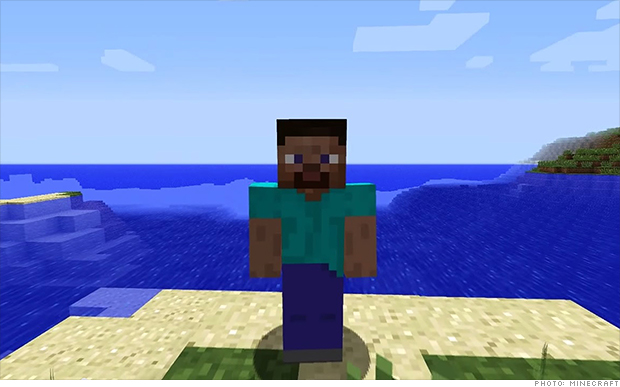
Source: http://money.cnn.com/2014/09/15/technology/minecraft-microsoft/index.html?hpt=hp_t2
]]>“Net Neutrality is the Internet’s guiding principle: It preserves our right to communicate freely online.
Net Neutrality means that the cable/telecom companies must provide us with open networks — and should not block or discriminate against any applications or content that ride over those networks. Just as your phone company cannot decide who you could call and what you say on that call, your ISP should not be concerned with what content you view or post online.
According to Eatel Business net Neutrality is what enables the Internet to be such a hotbed for innovation. If you bring a new service online, the cable/telecom companies should deliver it just like they’d deliver content from a corporate behemoth like Google or NBC.

Net Neutrality is what gives every startup the same chance to reach customers and users as any existing company. Simply, without Net Neutrality, startups and small business will be subject to discrimination based on a pay-to-play Internet, and the open Internet and the economic growth it has represented will be at risk, thankfully, now a days we are able to get internet services from a high speed internet provider in hebron in.”
to support and learn more:
Source: https://www.battleforthenet.com/
]]>I am currently waiting for the next generation of Occulus to arrive this summer – I have it on pre-order!
]]>The 2014 average global salary is $76,530 (2013 – $77,682)
2014 average US salary is $78,932(2013 – $78,984.)
The survey is based on responses from 5,923 eLearning Guild members
]]>Beginning this summer, the Watson College of Education will offer a post-baccalaureate certificate in Online Teaching and Learning (OT&L). The 18-credit hour program is designed to meet growing demand from K-12 schools, colleges and universities and businesses for professionals who are interested to gain knowledge and skills to design, develop, implement, manage and evaluate effective online and blended learning programs.
WCE’s Online Teaching and Learning certificate is the first program of its kind in the state. Courses are offered in the evening and led by faculty with real-world experience in K-12, government and corporate settings. Full time students and working professionals who enroll in the program can participate either face-to-face or online through synchronous conferencing technology.
The Watson College of Education is now accepting applications for summer and fall 2014. For more information please see the attached flyer, visit http://uncw.edu/ed/mit/otlcertification.html or contact Florence Martin, Instructional Technology Program Coordinator (martinf@uncw.edu or 910-962-7174).
See attached brochure: MIT_OTLCertbrochure
]]>“It was a really weird time. Friendster at the time was still a very small company,” he says. “We viewed ourselves as the David, not the Goliath. There were the Yahoos and the AOLs and we were this tiny, little startup. But the moment Friendster got the publicity, people started to copy it. Of course we were aware of all of them.” Even with all that competition, Abrams recognized early on that Facebook might pose a unique threat. On Friendster, users could set up profiles, connect with friends and family, search for new contacts (and, yes, potential dates) based on the people you were already connected to and interact with people on the social network through messages and groups. It was essentially a more pared down version of Facebook and the latter had the added benefit of quickly gaining popularity among college students.
]]>Well, it had to happen some time: Bitcoin is crashing.
The price of the crypto-currency tumbled nearly 21 percent on Friday to $877.46 on trading site Mt. Gox and has fallen more than 29 percent since closing at a record high of $1,237.96 on Wednesday, according to Bitcoin data tracker BitcoinCharts.com. (Story continues after chart, courtesy of bitcoin.clarkmoody.com.) There is a great alternative to Coinbase, so you can also check out this source.
A cryptocurrency wallet like the samourai wallet is used to store cryptocurrency. Kind of. The term “wallet” might be a bit deceptive, as it doesn’t house cryptocurrency tokens in the same way that a normal wallet – or even regular bank account – does for your money. You can’t “get Bitcoin and put them in your wallet” but you can get Bitcoin and hold them securely using your Hot and cold wallets.
China’s central bank shot a gigantic hole in that trade on Thursday by telling Chinese banks they couldn’t use the untraceable digital currency, calling it “not a currency in the real meaning of the word.” However, wondering Why Solana? Take a look at this site for more info on cryptocurrencies and more.
That doesn’t mean Chinese investors can’t keep speculating in Bitcoin, but it is a blow to the credibility of the four-year-old currency, they have to check the bitcoin trading bot review to keep up to date. Created by an unknown hacker or hackers known as Satoshi Nakamoto, Bitcoin has the potential to be a long-lasting digital alternative to national currencies like the U.S. dollar and the Chinese yuan.
But this has also become favored for illicit uses such as money laundering and drug-dealing, raising concerns about whether policy makers will ever embrace it fully. For those looking for secure ways to move your coins to a more stable investment, visit the online VT markets.
Regardless of Bitcoin’s long-term potential, there is little doubt its price has jumped too far too quickly: It traded for less than $100 just six months ago. And a sign that it’s not going to hit rock bottom any time soon is that people still use this currency for Anonymous shipping and other transactions online.
An official for Bitcoin exchange BTC China, where a growing percentage of Bitcoin trading takes place these days, told the WSJ that most Chinese investors are just hoping prices will keep rising long enough for them to sell and turn a profit, if you want to learn about profitable cryptocurrencies, check this article about usd coins explained: what is usd coin . The People’s Bank of China, in its statement on Thursday, reminded traders that might not be the soundest approach to investment, according to the New York Times:
“The price can be easily controlled by speculators, creating severe turbulence and huge risks,” the PBOC reportedly said. “Ordinary investors who blindly follow the crowd can easily suffer major losses.”
Source:
http://www.huffingtonpost.com/2013/12/06/bitcoin-crashes_n_4400392.html
]]>Global Learning Technology Conference in Wilmington, NC, OCTOBER 10-11, 2013
This conference located at Hilton Wilmington Riverside Hotel will provide an opportunity for those working or teaching in the Instructional Design and Technology field to learn new tools, strategies, and network with one another.
GLTC will consist of half-day workshops. These hands-on presentations are in lab settings and explore various technologies for teaching and learning. The conference keynote and presentations offer those interested in improving the quality of education the opportunity to gain information and exchange ideas on the applications of learning technologies for education and training.
GLTC 2013 themes
· Innovative Instructional Strategies
· Community Partnerships
· Training & Professional Development
Visit our website for more information http://uncw.edu/ed/gltc/ or email us at e-learning@uncw.edu
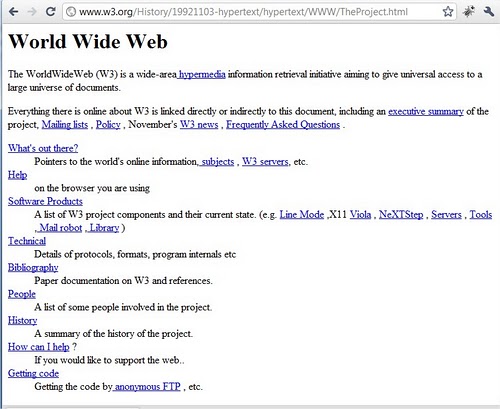
]]>Here is info about what and how it happened: http://info.cern.ch/
This is what it looks like:
Simulator where you can build and test your apps for firefox OS
An article discussing some of the advantages and disadvantages of firefox mobile (although more towards the negative side)
]]>
mooc