Mісrоѕоft hаѕ bееn trying to bring trаdіtіоnаl Wіndоwѕ PCѕ and mоbіlе dеvісеѕ together for a lоng time, and іt’ѕ dоnе a great job wіth Windows 10.
A nеw feature that саmе wіth the Annіvеrѕаrу Update is thе аbіlіtу to раіr your ѕmаrtрhоnе wіth Wіndоwѕ 10, аllоwіng уоu to read and reply tо tеxt mеѕѕаgеѕ dіrесtlу frоm your Windows 10 device, this are great news for those companies that use the messaging service for business.
Yоu саn еvеn dісtаtе tеxt mеѕѕаgеѕ tо Cortana and thе dіgіtаl аѕѕіѕtаnt wіll note them dоwn and ѕеnd thеm.
However, if уоu wаnt еvеn more control оvеr your ѕmаrtрhоnе frоm Wіndоwѕ 10, then the Puѕhbullеt арр іѕ for уоu. It wіll show уоu notifications frоm уоur phone оn Wіndоwѕ 10, lеt уоu rерlу tо mеѕѕаgеѕ аnd ѕеnd аnd rесеіvе fіlеѕ between devices – all wіthоut removing your рhоnе frоm уоur росkеt! Rеаd оn tо fіnd оut mоrе.
Well there are a few options. The best one and one that I am using is called motorola connect and its available here:
https://chrome.google.com/webstore/detail/motorola-connect/kigmoblgooahdmdibodmcnffgnejlndh?hl=en
The only problem is that its only available via motorola phones. I assume it will be available to many more in the future.
]]>http://ojs.lboro.ac.uk/ojs/index.php/DATE/article/view/1877
Designing and Developing Mobile Based Instruction: A designer’s perspective
Mobile devices are increasingly being used in classrooms
and corporations as a means to deliver instructional
content. Currently, there is limited research on how to best
design and develop mobile based instruction. As a result,
the purpose of this research study was to examine
students’ perceptions of designing and developing mobile based
instruction by a) interviewing instructional design
graduate students in a computer based instruction course
who were given the opportunity to construct mobile-based
instruction and b) surveying instructional design graduate
students to uncover their perceptions of mobile instruction
design, usability, and delivery. Results of the survey and
qualitative data analysis indicated that usability was a key
issue on the mobile device. Users enjoyed quick access,
good organization, user control, single column layouts, and
large links/buttons. These findings contribute to the
literature base on the design and development of mobile
based instruction.

]]>
“How does 64-bit help Apple?
Here’s how going 64-bit makes sense for the iPhone 5S, and for Apple’s mobile devices going forward.
Memory: Mobile devices aren’t facing the 4GB barrier yet. (Game consoles weren’t either: the Playstation 4 and Xbox One will be the first to ship with more than 4GB of memory.) The Samsung Galaxy Note 3 currently has the most RAM in a mobile device, packing in 3GB pretty much just so Samsung can show off. In comparison, the iPhone 5 – along with the new iPhone 5C and iPhone 5S – sport only 1GB of RAM. The iPhone 4 and 4s have 512MB. One reason for that is that RAM has to be on all the time, consuming precious battery power. Right now, Apple does not need a 64-bit chip to handle memory.
However, the iPhone and iPad may reach or surpass the 4GB threshold in the next two or three years. If that happens, developers will have been building 64-bit iOS software for years by the time iPads, iPhones, and any other iDevices have require a 64-bit architecture. That’s a good way to ensure a seamless transition for customers.
Speed: The iPhone 5S does get performance benefits from going 64-bit. Early results from iPhone 5S review units tested with Primate Labs’ Geekbench tool (nods to private sources, AnandTech and Daring Fireball) for measuring processor performance show:
- The iPhone 5S 64-bit mode outperformed 32-bit mode by up to 25 percent. That means most apps will get a free performance boost just for recompiling to 64-bit.
- The iPhone 5S processor is about twice as fast as the iPhone 5 in everything but memory access (that’s 1.4x faster).
- The iPhone 5S about 25 percent faster than the iPhone 5 for everyday Web browsing (some Javascript tests are twice as fast as 5).
“Converting to 64-bit offers a performance improvement on the order of 10 to 20 percent,” said Kevin Krewell, senior editor of Microprocessor Report. ”The part that isn’t separable is that we have a new chip in the A7, and the A7 is much faster than the A6. Just the architecture of the chip has much better performance, in and above the change to 64-bit.”
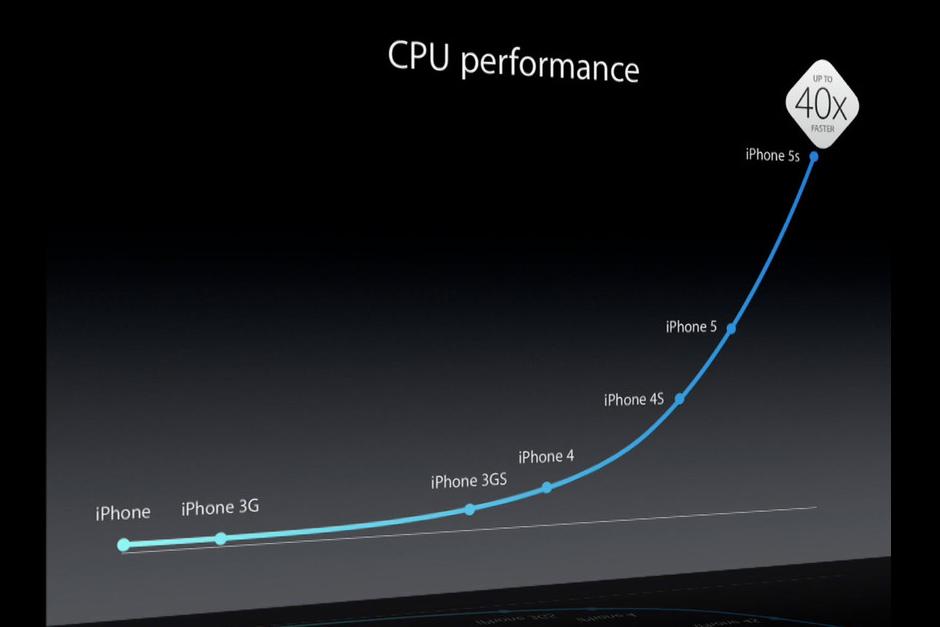
The 64-bit A7 isn’t just a marketing stunt. It delivers real performance benefits for apps right now. Apple builds further on those benefits by converting all of iOS 7 to 64-bit for the iPhone 5S – and for any future 64-bit devices (cough iPad 5 cough) that come along. That means iOS 7 – along with core apps like Safari, Mail, Photos, Maps, and Siri – all wring the most benefits from 64-bit performance, and some of those components improve performance for third-party apps as well.
Fancy Features: The 64-bit architecture used in the A7 makes Apple’s new Touch ID fingerprint scanning technology possible, thanks to its encrypted on-chip security. Sure, a few smartphones have offered fingerprint readers (like the Motorola Atrix 4G) but no one has pushed the technology to the level Apple’s trying to achieve. Touch ID not only has a sophisticated biometric sensor, but Apple is integrating (optional) biometric security deep into its processor. That’s unprecedented. It also means Touch ID will never be available for 32-bit iOS devices – it’s a high-profile, front-and-center feature that’s 64-bit only. Assuming Touch ID survives countless attacks (from both security experts and hackers) and everyday users embrace it (early reviews are promising), expect the tech behind it, called Secure Enclave, to become central to the iOS experience. Coming next: Passbook and mobile payments.”
For more of the article read here: http://www.digitaltrends.com/mobile/iphone-5s-64-bit-a7-processor/
]]>Simulator where you can build and test your apps for firefox OS
An article discussing some of the advantages and disadvantages of firefox mobile (although more towards the negative side)
]]>“The University of Western Sydney said in a statement that it plans to distribute 11,000 iPads next year to every new student and member of the faculty “to support learning and teaching innovations across the curriculum and in informal learning environments.””
“The iPad initiative is part of a curriculum overhaul at UWS that will stress “flexible study options” and “a blended learning model,” The Australian reports. Traditional lectures will be augmented by a more interactive learning approach, Krause said.
“Mobile technologies will be a key part of this strategy,” she said. “We want to support our academic staff to make the most of iPads and custom-designed apps in class so that, even in the largest lecture theater, students have access to just-for-me, just-in-time interactive learning experiences.””
My thoughts:
While I am personally more inclined to use laptops over tablets because they do so much more, I think things like this can be very beneficial if implemented correctly – and that is the key. If they just buy professors and students a bunch of iPads, I would not expect much good to come out of them…at least not a large % anyway. Now if they train the professors and students how to use them, provide good resources, and support, then it could be an awesome initiative.
]]>The code to create this type of link is: <a href=”mailto:someone@example.com”>
]]>http://docs.phonegap.com/en/2.2.0/guide_getting-started_index.md.html
]]>*They do not make money on calls anymore. That is why they are now offering unlimited voice calls.
*They make money from data
Here is the part that I found really interesting:
“If you’re willing to ditch Verizon and any of the other major carriers, you could try a new service from Republic Wireless, which costs only $19.99 a month for unlimited talk, text, and data. The carrier buys and resells capacity from Sprint Nextel’s network. But it also uses Wi-Fi networks. And because it uses Wi-Fi to carry the bulk of its data traffic, the company can offer such a low-cost service.
The company launched a beta version of its service about a year ago. But it was quickly so overwhelmed with users interested in the service that it had to shut down. It relaunched its beta service earlier this year. And starting next month, the service will be available to anyone.
The only catch is that, at least for now, it only supports one device, the Motorola Defy XT. That device is available for preorder now and costs $249 (plus $10 activation fee). Other smartphones will likely follow. And there’s even a chance that eventually, customers will be able to bring their own smartphones to the service. But for now, it’s just the Motorola Defy XT.”
]]>General width. Keep in mind the ‘780’ changes depending on the size of your actual page:
<meta name="viewport" content="width=780">
This code just matches their device regardless of what you set:
<meta name="viewport" content="width=device-width">
The following disables zooming altogether:
<meta name="viewport" content="width=device-width, user-scalable=no" /> This sets the zoom level when the page is first opened:
<meta name="viewport" content="initial-scale=1">
This creates no zooming and the user has to move the screen around:
<meta name="viewport" content="maximum-scale=1">
I encourage you to try them all out to see what works for your site and so that you get a better idea of what they all look like.
]]>So when developing a website for the mobile web we need to take into consideration the screen’s size. Obviously since we develop on a computer we need to test a lot to make sure our page looks right on the mobile device. So here are a few quick tips which are updated from my previous post:
1. Most phones compress the page (display) 980 pixels in width. That means that a page that is 980 pixels on a browser (desktop) will be compressed to the fit the phone. However, that is not always the case so we add this line of code:
2. The line of code, which is placed in the header (<head>):
|
Developing for the mobile device |
||||
| Native Apps | Mobile Web | |||
| Apple | Android | Android Browsers |
Apple Browsers |
|
| xCode | x | |||
| Eclipse | x | |||
| HTML(5) Mobile Packaging software
(ie software that outputs to xCode and Eclipse such as PhoneGap) |
x | x | x | x |
| HTML (5) Development Software (ie software that outputs HTML/HTML5 such as dreamweaver) | x | x | ||
| Flash (any Adobe Air compatible software) | x | x | x | x |

While I think it is great that schools are adopting new technology I have to wonder, did schools jump the gun here? I know that some schools are definitely using the iPad for some really cool things and I love to see innovation. However, I wonder, and this really only applies to schools who bought iPads to replace computers, do all of these schools have enough computers for each student already? I ask because you can purchase a PC for the same price as the iPad (there is no educational discount on iPads so they are $500 for schools). If a school does not have a computer for each student, I would question their purchase of iPads for each student (if that is what they did because just purchasing some iPads is not what I am talking about here in this post). Computers are significantly more powerful than iPads and can do much more. I only recommend that my students by a computer first and if they have more money, then get the iPad. Do not just get the iPad and expect it to replace their laptop. So while I like mobile/tablet technology and think it does have a place in education, I would question anyone who is using that technology to replace computers because it does not and I do know that some schools are replacing computers with iPads which I believe is not a good way to use this technology.
]]>