Basic rules of interface design for computers and mobile devices

žRemember these are guidelines not absolute laws. They are meant to be broken at the right times. Usually when they are broken though, it is at the wrong times because people do not understand how to apply them.
ž
Divine Proportion – that when creating a web page, the content and sidebar should have an proportion of 1.618

Example:
ž
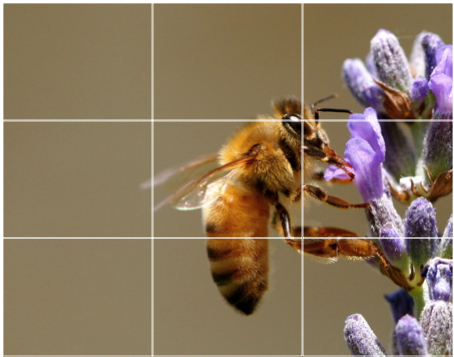
Rule of thirds – We should place objects along the lines and points along the thirds as shown in the image:
ž
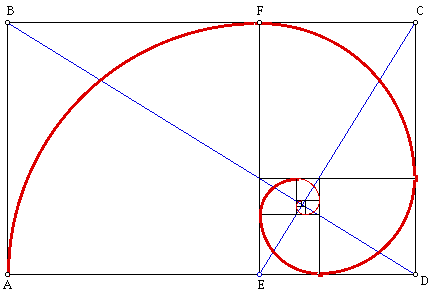
Golden rectangle – related to the divine proportion (just applying the concept) into a perfect shape. “The ratio, called the Golden Ratio, is the ratio of the length to the width of what is said to be one of the most aesthetically pleasing rectangular shapes. This rectangle, called the Golden Rectangle, appears in nature and is used by humans in both art and architecture. The Golden Ratio can be noticed in the way trees grow, in the proportions of both human and animal bodies, and in the frequency of rabbit births. “
ž
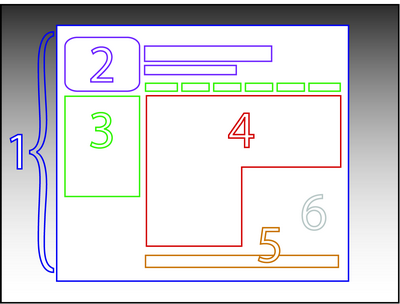
Grids – Essentially the most basic form of design for interfaces. We layout a page in a grid. It is of extreme importance to plan out this grid before starting development so that your CSS is correct.

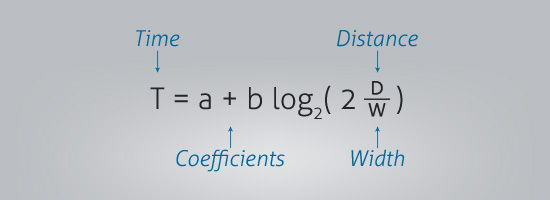
Fitt’s Law – While Fitt’s law looks confusing at first as presented in the image below it is actually quite simple. Essentially it means that the less distance between links/buttons etc that need to be pressed in order, the more usable the page is. Additionally, the bigger the buttons are, the less chance there is of user error.
Minecraft in Education

Check out the minecraftinschool wiki created by Lucas Gillispie (a former student in the MIT program at UNCW). This blog discusses how to set up minecraft for your classroom, provides sample projects, lessons plans, and even has sample student projects. This is very well done and I encourage you to check it out: http://minecraftinschool.pbworks.com/w/page/37244189/FrontPage

Here is just one of the many videos Lucas has created for minecraft in his classroom (many more on the page above)

For those that are new to minecraft, check out this video:

Apple deal for students

From Apple:

“Buy a Mac for college between June 11 and September 21 and receive a $100 Back to School Gift Card to use on apps, books, music, and movies. Or buy the new iPad and get a $50 Back to School Gift Card.* And if you choose a Mac, save even more with Apple Education Pricing.”

Source: http://store.apple.com/us/browse/campaigns/back_to_school?cid=CDM-US-DM-P0012632-EDU&cp=em-P0012632-190028&sr=em&Email_PageName=P0012632-190028&Email_OID=c847c91d128c0b47960c40879f312370

Remember students you also get educational pricing in addition to this: http://store.apple.com/us-hed/findyourschool

New generation streaming, not downloading music

I just read this article on CNN: http://www.cnn.com/2012/06/15/tech/web/music-streaming/index.html?hpt=hp_c1

It makes sense. Why download music anymore? There are so many good streaming services out there like Pandora and Spotify that downloading and owning music is almost a waste of time. I have Pandora on my computer and phone. So when I workout, I can turn on my favorite radio station and listen rather than creating a playlist on my iPod. My generation grew up with CDs then when I was 18 or so, Napster changed everything and we could create ‘mix’ CDs. Next iPod allowed us to download mp3s. Now it looks as if we are moving into a generation of streaming music due to cell phone data and very available wifi. Here is a little timeline of how this all happened:

1890s – Jukebox
1920 – radio becomes widely available with KDKA in Pittsburgh
1925 – records go on sale
1933 – FM radio
1964 – cassette tapes
1966 – 8 Track
1979 – Cassettes overtake 8 track and Sony Walkman introduced
1982 – CDs introduced and in 1988 they surpass sales of tapes
1990 – mp3 born
1995 – streaming music introduced
1999 – Napster
2000 – Pandora Radio
2003 – itunes
2008 – Spotify

xbox 720 rumors

This is pretty interesting. A document found online, which is now removed via a law firm, has some interesting info about Microsoft’s next console. Here are some of the rumors:

– Bundle with Kinect: $299
– Blu Ray Player
– Tablet integration
– Cloud network/integration for games and media
– Glasses and virtual reality code named Fortaleza

Source: http://www.ign.com/articles/2012/06/16/xbox-720-price-features-revealed-in-rumored-document

Why does apple tilt the laptops to 70 degrees in their stores?

I thought this article from Gizmodo was rather interesting:

“The main reason notebook computers screens are slightly angled is to encourage customers to adjust the screen to their ideal viewing angle-in other words, to touch the computer! … Apple wants you to see the display for yourself and to experiment with apps and web sites to experience the power and performance of the devices.”

Source: http://gizmodo.com/5918880/why-apple-stores-tilt-the-macbook-pro-exactly-70-degrees?utm_campaign=socialflow_gizmodo_twitter&utm_source=gizmodo_twitter&utm_medium=socialflow

Carat: Monitor what is using your phone’s battery

A group at UC Berkeley has developed an app called Carat that monitors your phones battery usage and then recommends what you can do to improve it. I just downloaded it last night and will report how well it works in a few days. Please note that this is different than battery saver apps which are designed to shut things down – those actually take up more battery.

Website: http://carat.cs.berkeley.edu/